
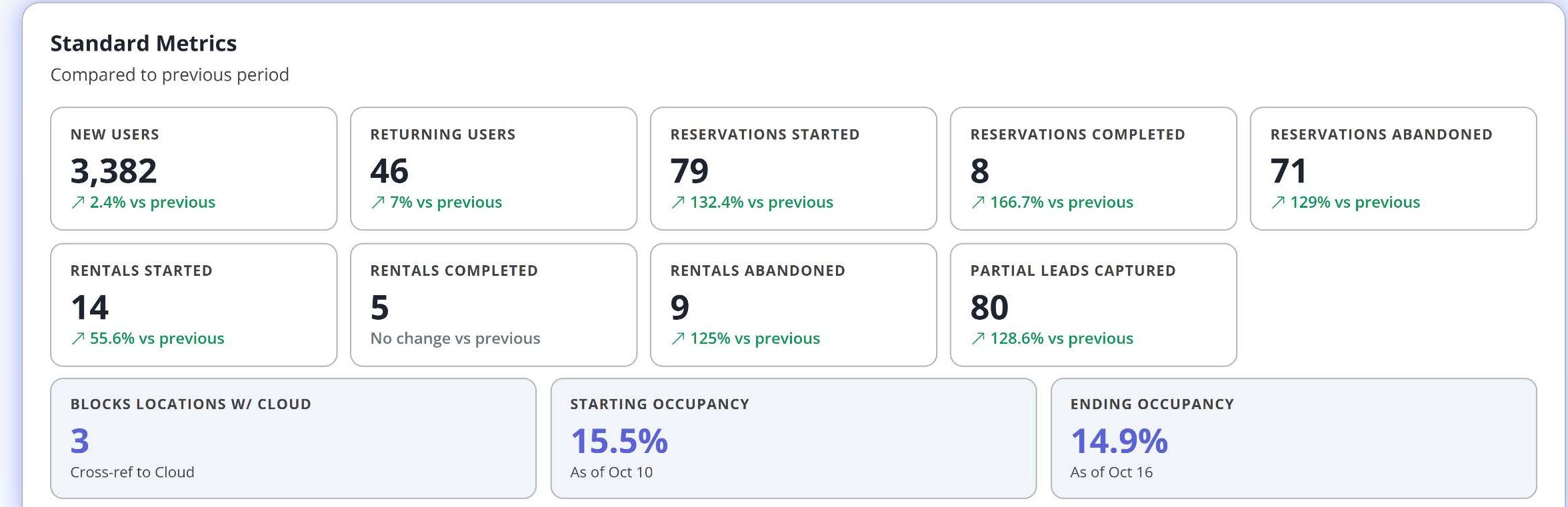
The Standard Metrics section near the bottom of your Blocks Analytics Dashboard gives you the detailed numbers behind the summary cards. Every metric is compared to the previous period and follows your selected filters.
Visitors
- New Users – First-time visitors to your website during the selected period. This shows how many new people are discovering your site.
- Returning Users – Visitors who had been to your site before. Renters often visit several times while comparing facilities, so returning users are a good sign of serious interest.
The reservation funnel
- Reservations Started – Visitors who began a reservation form.
- Reservations Completed – Reservation forms successfully submitted.
- Reservations Abandoned – Reservations started but not finished.
The rental funnel
- Rentals Started – Visitors who began a rental form.
- Rentals Completed – Rental applications successfully submitted.
- Rentals Abandoned – Rentals started but not finished.
Started = Completed + Abandoned. Comparing these three numbers shows exactly where people drop off.
Partial Leads Captured
Partial Leads Captured combines your abandoned rental and abandoned reservation records. In the example above, 9 abandoned rentals plus 71 abandoned reservations equals 80 partial leads.
Partial leads represent people who were interested enough to start a form. When a visitor leaves partway through, Blocks can still capture the contact information they entered so your team can follow up. Some records may not include enough information to contact the person.
Tip: Partial leads are some of your warmest prospects. A quick call or email within a day can turn an abandoned form into a move-in.
Locations and occupancy
- Blocks Locations w/ Cloud – The number of your Blocks locations that are also connected to Adverank Cloud.
- Starting Occupancy – Occupancy at the beginning of the selected date range.
- Ending Occupancy – Occupancy at the end of the selected date range.
Occupancy comes from Adverank Cloud. When All Locations is selected, occupancy is averaged across your connected locations. The Source filter does not affect occupancy.
Blocks Tools

At the very bottom of the dashboard, Blocks Tools gives you quick links to the same places available in the left sidebar:
- Page Tools – Build and customize your website pages.
- Blog Manager – Create and manage blog content.
- Location Manager – Manage your locations and their settings.
- My Account – Manage your account and preferences.
- Get Help – Access guides, resources, and support.