
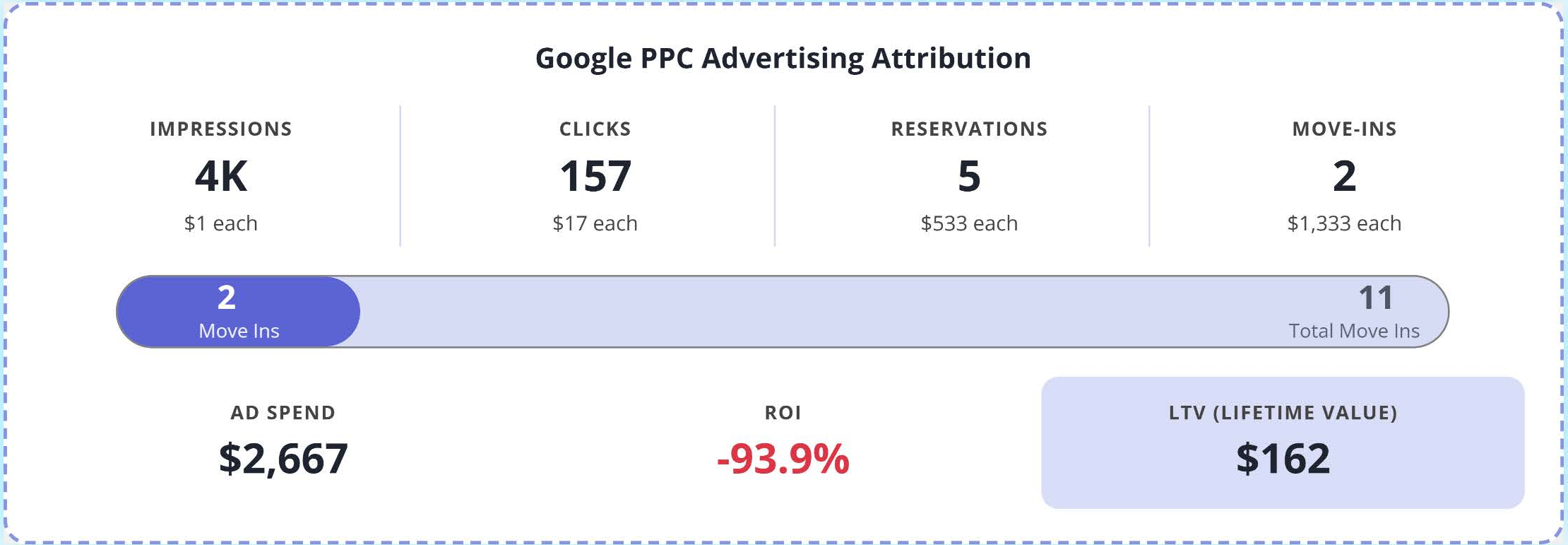
The Google PPC Advertising Attribution section answers the question every operator asks: "Are my ads actually renting units?" It follows your Google Ads activity from the first impression all the way to move-in, with the cost of each step.
This section only appears when the Source filter is set to All Sources or Google PPC.
The funnel, left to right
| Metric | What it means |
|---|---|
| Impressions | How many times your ads were shown on Google. |
| Clicks | How many times people clicked your ads and visited your website. |
| Reservations | Reservations attributed to your Google PPC campaigns. |
| Move-Ins | Move-ins that can be attributed to Google PPC. |
The smaller number under each metric (for example, $17 each) is your cost for that step: your ad spend divided by that count. In the example above, $2,667 in ad spend produced 157 clicks at about $17 each, 5 reservations at $533 each, and 2 move-ins at $1,333 each.
Cost per move-in is the number to watch. Clicks and conversions are easy to inflate. Move-ins are what fill your facility.
The move-in progress bar
The bar shows how many move-ins came from Google PPC compared to your total move-ins for the period. In the example, 2 of 11 total move-ins are attributed to Google PPC.
Ad Spend, ROI, and LTV
- Ad Spend comes from your Adverank Cloud connection.
- LTV (Lifetime Value) is calculated from how long your tenants stay.
- ROI compares the lifetime value of your attributed move-ins to your ad spend. A negative ROI means the estimated lifetime value of those move-ins hasn't yet covered what you spent.
For new facilities or locations with limited history, LTV and ROI may be less informative until more length-of-stay data is available. In those cases, focus on cost per reservation and cost per move-in.
How attribution works
Rental and reservation forms are built directly into your Blocks website and connect to your facility management software. When a visitor arrives from a Google ad and rents or reserves, that source is passed into your FMS along with the rental. When the tenant moves in, the move-in record knows they came from Google PPC.
If you also use Adverank Cloud, that move-in data feeds back into your ad budgets so your spend follows what is actually filling units.
What to do with this data
- Cost per move-in feels high? Check the location filter to see whether one facility is driving most of the spend, then talk with your Adverank team about budget and targeting.
- Lots of reservations, few move-ins? The ads are working; the gap may be in follow-up or the move-in process.
- Few reservations from many clicks? Review the location pages your ads send people to, along with your pricing and promotions.