
Below the AI Performance Summary are three summary cards. Together they give you a quick pulse on website traffic and form activity for your selected filters. Each card compares to the previous period and shows both completed and abandoned activity.
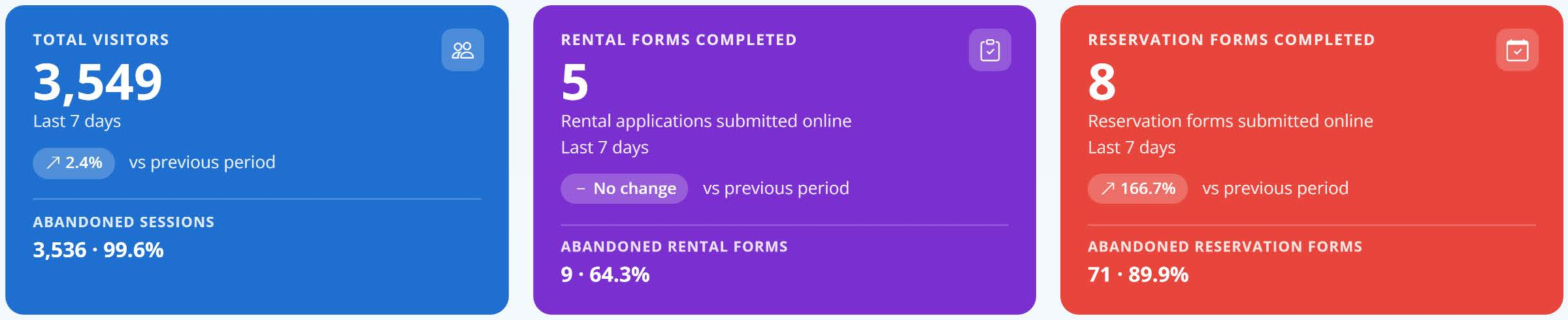
Total Visitors (blue card)
What it shows: The number of unique visitors to your website during the selected period. This counts people, not page views, and returning users can be included.
Compared to previous period: The small percentage badge shows how visitors changed versus the previous period.
Abandoned Sessions: Visitors who did not complete a rental or reservation form, shown as a count and a percentage of total visitors.
Example: 3,549 total visitors with 13 completed forms (5 rentals + 8 reservations) means 3,536 abandoned sessions, or 99.6%. A high percentage here is normal. Most website visitors are researching, comparing prices, or looking up directions.
Rental Forms Completed (purple card)
What it shows: The number of rental applications successfully submitted online.
Abandoned Rental Forms: A form is counted as abandoned when a visitor interacted with it enough to create a record but did not finish the rental. The percentage is based on all rentals started.
Example: 14 rentals started, 5 completed, and 9 abandoned gives a 64.3% rental abandonment rate.
Reservation Forms Completed (red card)
What it shows: The number of reservation forms successfully submitted online.
Abandoned Reservation Forms: Visitors who entered the reservation form but did not finish it.
Example: 79 reservations started, 8 completed, and 71 abandoned gives an 89.9% reservation abandonment rate.
How to read the cards together
One metric rarely tells the whole story. A few patterns to watch for:
- Visitors up, completed forms flat. More people are finding you, but something is stopping them from converting. Check pricing, unit availability, and promotions on your busiest location pages.
- Forms started way up, abandonment way up. Interest is strong but people are dropping out of the form. Review your Partial Leads (see Standard Metrics, Partial Leads, and Occupancy) and follow up.
- Visitors down, completed forms steady. You're getting fewer but better-qualified visitors. Check Top Lead Sources to see which channel changed.
Review these cards alongside your traffic sources and the Google PPC Advertising Attribution section for a complete picture.