
Every Adverank Blocks website now includes a built-in analytics dashboard. It shows how your website is performing, where your visitors and leads come from, and how your advertising turns into actual move-ins. There is nothing to install and no add-on to purchase. Log in to Blocks and the dashboard is the first screen you see.
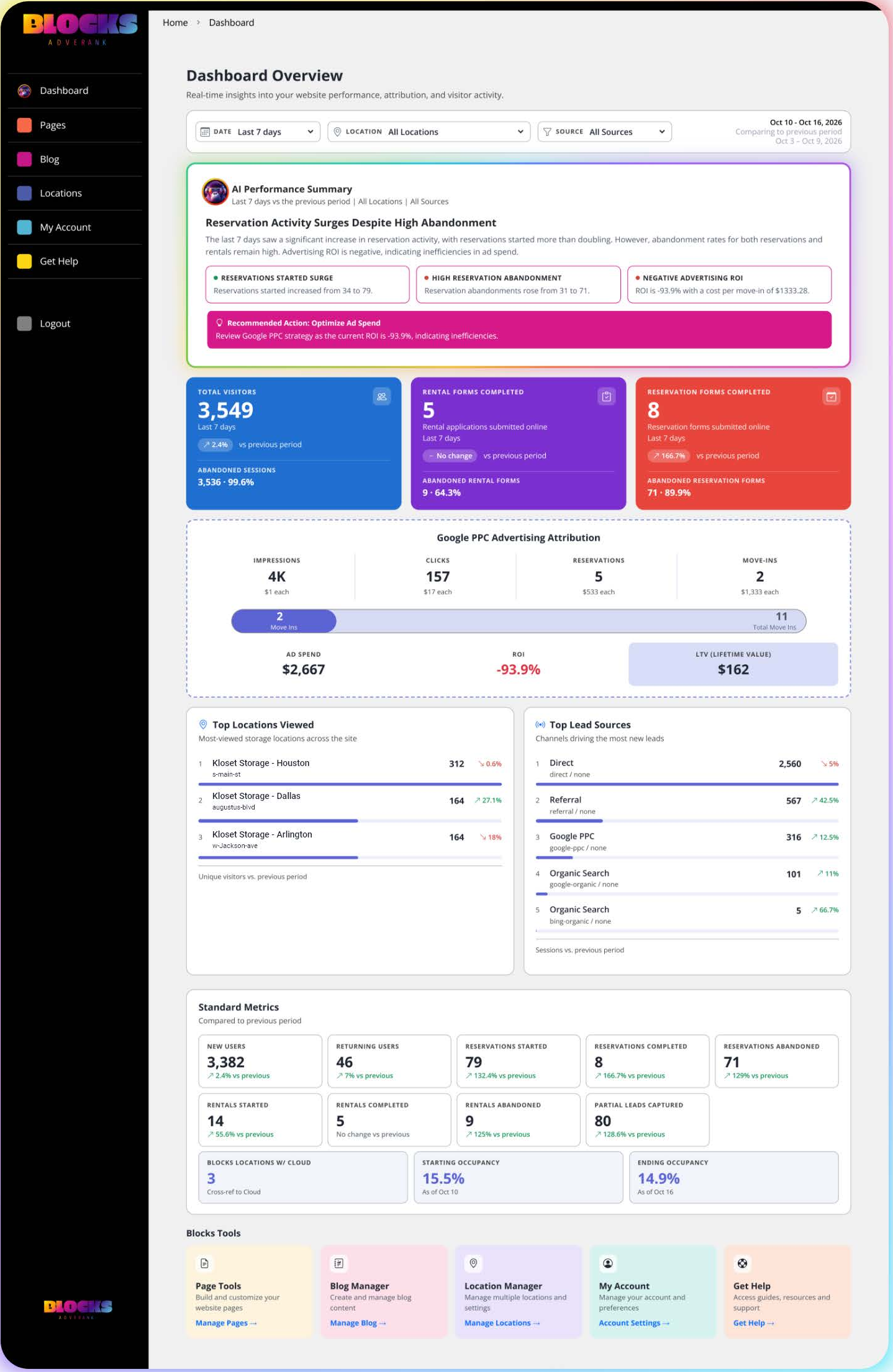
What makes this dashboard different
Plain-English insights first. The top of the dashboard is an AI Performance Summary written from your latest data. Instead of making you dig through charts, it tells you what changed and what to look at next.
Numbers you can trust. Because Adverank builds and hosts your Blocks website, activity is recorded on our servers when a page loads or a form is submitted. Ad blockers, privacy-focused browsers, and declined cookie banners don't hide those visitors the way they can in Google Analytics.
Attribution all the way to move-in. Rental and reservation forms are built into your website and connect to your facility management software (FMS). The visitor's source is passed along with the rental, so the dashboard can show which advertising led to real move-ins, not just clicks.
How the dashboard is organized
The dashboard reads from top to bottom:
- Filters – Choose the date range, location, and traffic source. Every section updates to match. See How to Filter Your Blocks Analytics Dashboard.
- AI Performance Summary – A headline, key insight cards, and sometimes a recommended next step. See Understanding the AI Performance Summary.
- Summary Cards – Total Visitors, Rental Forms Completed, and Reservation Forms Completed, each with abandoned activity. See Understanding the Summary Cards.
- Google PPC Advertising Attribution – Impressions, clicks, reservations, move-ins, ad spend, ROI, and lifetime value. See Understanding Google PPC Advertising Attribution.
- Top Locations Viewed and Top Lead Sources – Which facilities get the most attention and which channels drive the most activity. See Top Locations Viewed and Top Lead Sources.
- Standard Metrics – New and returning users, the full rental and reservation funnel, partial leads, and occupancy. See Standard Metrics, Partial Leads, and Occupancy.
- Blocks Tools – Shortcuts to Page Tools, Blog Manager, Location Manager, My Account, and Get Help.
A good habit to start with
Set the date filter to Last 7 days, read the AI Performance Summary, then check the three summary cards. In under five minutes you'll know whether traffic is up or down, whether visitors are finishing their rentals and reservations, and whether your ads are paying off.